
SMS Opt-In
Busy sends text messages for one purpose today: one-time verification codes (two-factor authentication) for signing in to Busy applications. This page shows exactly how a person opts in, the consent language they see, and how to stop.
How opt-in happens
During account setup or in account settings, a user chooses to enable SMS verification and enters their own mobile number. Nothing is pre-filled and no number is imported from anywhere else. Codes are sent only when that user requests one during a sign-in or verification attempt — there are no scheduled, promotional, or marketing texts on this number.
The enrollment form
This is the form as it appears in the Busy app, on the Safety → Two-Factor Overrides screen. The consent checkbox is unchecked by default and the Enroll button stays disabled until the person checks it themselves:
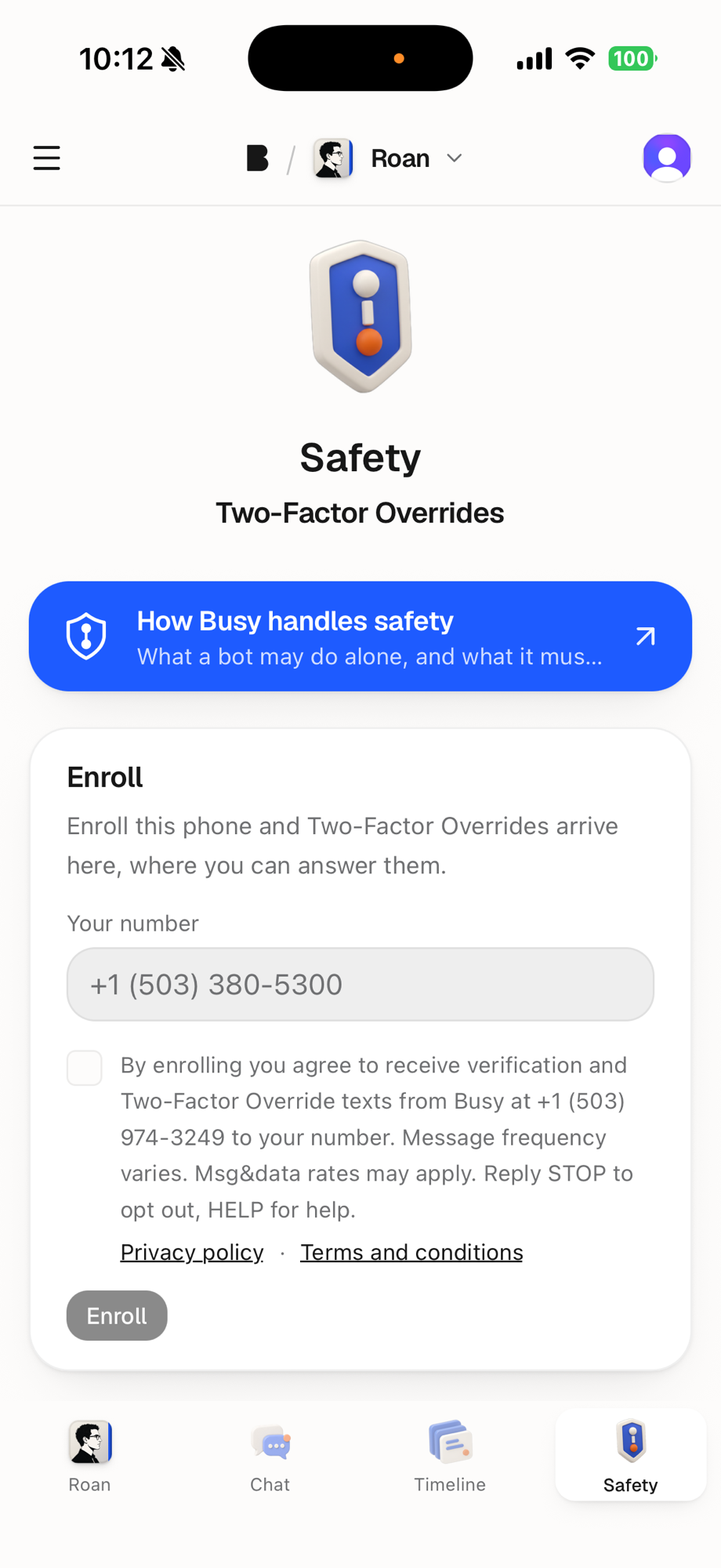
Your number: +1 (___) ___-____
[ ]By enrolling you agree to receive verification and Two-Factor Override texts from Busy at +1 (503) 974-3249 to your number. Message frequency varies. Msg&data rates may apply. Reply STOP to opt out, HELP for help. Privacy policy · Terms and conditions
[ Enroll ]
Stopping, and getting help
Reply STOP to any message to opt out; you will receive one confirmation and nothing further. Reply START to re-enable. Reply HELP, or write to jeff@busyincorporated.com, for help. SMS verification can also be turned off in account settings at any time.
Mobile numbers and opt-in consent are used only to deliver these messages. No mobile information is shared with third parties or affiliates for marketing or promotional purposes, and text messaging originator opt-in data and consent are not shared with any third parties, excepting the messaging carriers and Telnyx, our delivery provider, solely as required to deliver the messages.
See also Privacy Policy and Terms and Conditions